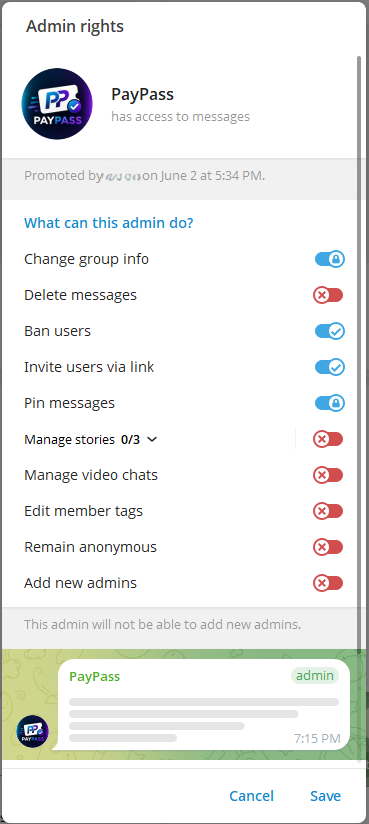
To allow PayPass to automatically generate invite links and evict members whose access has expired, the bot must be added to your community with specific administrator privileges.
Granting Administrator Privileges
The bot does not require full control over your chat, but it does need several administrative capabilities. Grant the bot the following privileges:
| Permission | Why It Is Required |
|---|---|
| Invite Users via Link | Required to dynamically generate secure, single-use join links for verified subscribers. |
| Ban/Restrict Users | Required to automatically evict members when their subscriptions expire. |
| Manage Chat (Optional) | Helps the bot verify membership updates and log joining accounts. |
Missing Permissions: If you omit the Ban Users permission, the bot will not be able to evict users, rendering your paywall ineffective.
Connecting a Group
- Open your Telegram Group settings.
- Select Administrators and click Add Admin.
- Search for
@PayPassTGBotand select it. - Ensure "Invite Users via Link" and "Ban Users" are enabled. Click Save.
- Post the group link or run `/start` to bind it to your project.
Connecting a Channel
- Open your Telegram Channel settings.
- Select Administrators and click Add Admin.
- Search for
@PayPassTGBotand add it. - Grant the "Invite Users via Link" permission. Click Save.